Sign In with Cross Authentication and Create Passkey
Cross Authentication happens when passkey authentication is not possible. This occurs when devices use different sync fabrics or cannot communicate directly with a passkey manager. To resolve this, LoginID uses OTP authentication to complete the sign-in process.
You can obtain an OTP for cross-authentication in the following ways:
- Sign in with a passkey on your original device and request an OTP using requestOtp method.
- Trigger an email with an OTP by using the requestAndSendOtp method.
Prerequisites
- Create an application to obtain a base URL. The SDK uses this base URL to interact with the LoginID authentication service.
Setup SDK
- Javascript
- Kotlin
- Swift
npm i @loginid/websdk3
Import and initialize an instance:
import { LoginIDWebSDK } from "@loginid/websdk3";

const lid = new LoginIDWebSDK({
  baseUrl: process.env.LOGINID_BASE_URL,
});
First, ensure you have the Maven Central repository in your project's settings.gradle.kts file:
repositories {
  google()
  mavenCentral()
}
Next, add the SDK and required dependencies to your app module's build.gradle.kts:
dependencies {
// LoginID SDK
implementation("io.loginid:auth:1.1.1")
}
Import the class within your application:
import io.loginid.auth

class MainActivity : AppCompatActivity() {
    val lid = LoginIDAuth(this, "<LOGINID_BASE_URL>")

    override fun onCreate() {
        super.onCreate()

        // Additional setup...
    }
}
Add the SDK dependency using Swift Package Manager in Xcode:
- In Xcode, open your project.
- Go to File → Add Package Dependencies….
- In the search bar, paste:
https://github.com/loginid1/loginid-ios
- Select the target(s) where you want to add the SDK and click Add Package.
Import the class within your view models:
import LoginIDAuth

@main
struct MyApp: App {
    private let lid: LoginIDAuth

    init() {
        LoginIDAuth(baseUrl: "<LOGINID_BASE_URL>")

        // Other setup code...
    }
}
Cross Authentication Method
- Request OTP From Original Device
- Email OTP
In this section, we explore how to implement OTP authentication via email. This method allows users to securely log in through a temporary OTP sent to their registered email. Below, we outline the process and provide sample code for integration.
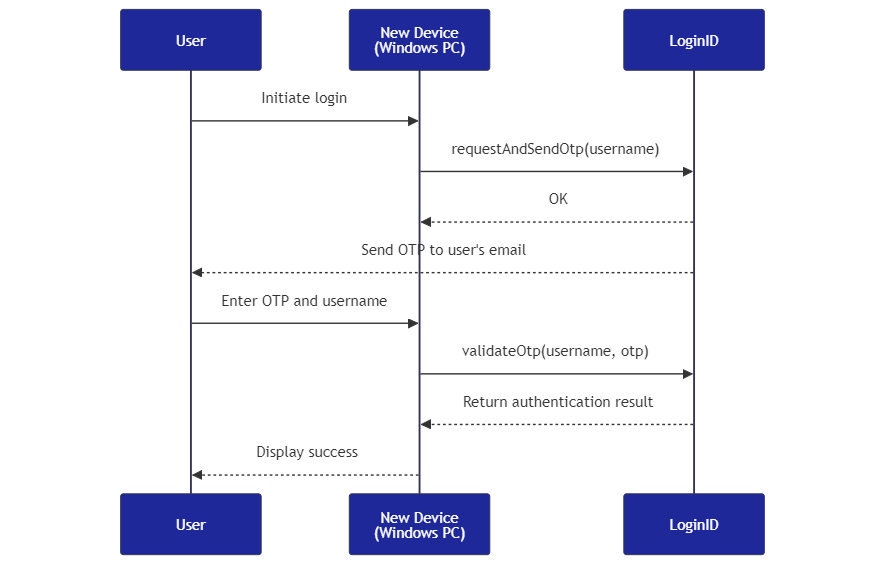
Diagram
Imagine the following scenario:
- The user’s passkey is stored in their iPhone's iCloud Keychain, but they are attempting to sign in on a Windows PC
- The user request an OTP using the requestAndSendOtp method on their Windows PC
- The OTP is sent to the user’s registered email and displayed there.
- The user enters the OTP on the Windows PC to sign in using validateOtp.
- After successful authentication, the user is prompted to add a new passkey to the Windows PC using createPasskey.
Request and Send OTP
We send an OTP to the registered username using the requestAndSendOtp method. LoginID will send the OTP via email to the user.
- Javascript
- Kotlin
- Swift
import { LoginIDWebSDK } from "@loginid/websdk3";

const lid = new LoginIDWebSDK({
  baseUrl: process.env.REACT_APP_LOGINID_BASE_URL,
});

const SendOTP: React.FC = () => {
  const [username, setUsername] = useState<string>("");
  const [error, setError] = useState<string>("");
  const [success, setSuccess] = useState<string>("");

  const handleSendOTP = async (e: React.FormEvent) => {
    e.preventDefault();

    try {
      // Send an OTP under the user's email
      await lid.requestAndSendOtp(username, "email");

      setSuccess("OTP sent successfully!");
    } catch (e) {
      if (e instanceof Error) {
        setError(e.message);
      }
    }
  };
};
import androidx.lifecycle.lifecycleScope
import io.loginid.auth.LoginIDAuth
import io.loginid.core.enums.MessageMethod
import io.loginid.core.errors.LoginIDError
import kotlinx.coroutines.launch

class MainActivity : AppCompatActivity() {
    private lateinit var usernameEditText: EditText
    private lateinit var errorTextView: TextView
    private lateinit var generateCodeButton: Button
    private val lid = LoginIDAuth(this, "<BASE_URL>")

    private fun handleSendOTP() {
        val username = usernameEditText.text.toString()
        errorTextView.text = ""

        lifecycleScope.launch {
            try {
                // Send an OTP code under the user's email
                lid.requestAndSendOtp(username, MessageMethod.EMAIL)

                successTextView.text = "OTP sent successfully!"
            } catch (e: Exception) {
                when (e) {
                    is LoginIDError -> {
                        errorTextView.text = e.message ?: "A LoginID error occurred"
                    }
                    else -> {
                        errorTextView.text = e.message ?: "An error occurred"
                    }
                }
            }
        }
    }
}
import SwiftUI
import LoginIDAuth

@main
struct ExampleApp: App {
    @State private var errorMessage: String? = nil
    @State private var username: String = "user@example.com"
    private let lid = LoginIDAuth(baseUrl: "<BASE_URL>")

    private func sendOtp() async {
        do {

            // Send an OTP under the user's email
            try await lid.requestAndSendOtp(
                username: username,
                method: .email
            )

            // OTP sent
        } catch let error as LoginIDError {
            errorMessage = error.message
        } catch {
            errorMessage = error.localizedDescription
        }
    }
}
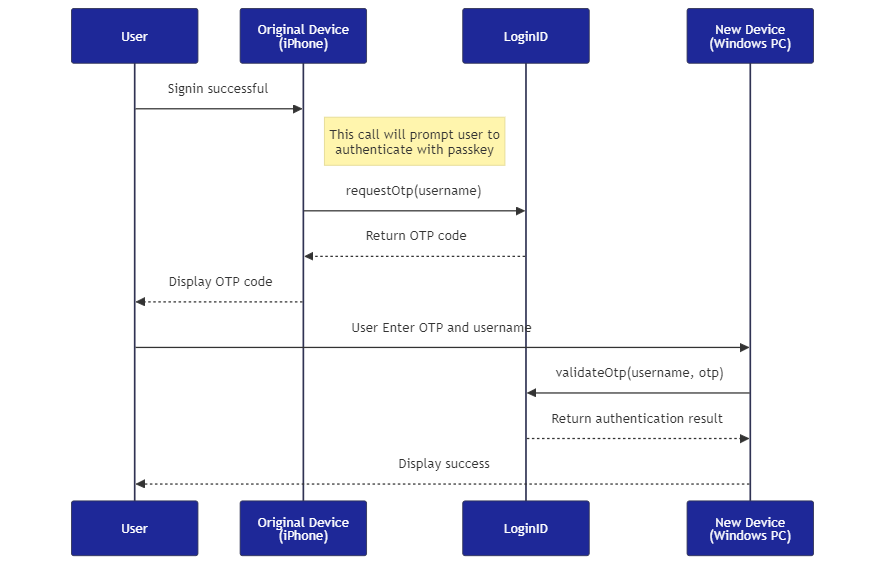
In this section, we’ll walk through how to request an OTP on the original device. Before generating the OTP, the user must authenticate using a passkey. Once authenticated, the OTP can be displayed to the user and used for authentication on another device.
Below are the steps and sample code to implement this process. You can integrate this feature within the user’s security or profile settings.
Diagram
Imagine the following scenario:
- The user’s passkey is stored in their iPhone's iCloud Keychain, but they are attempting to sign in on a Windows PC
- The user authenticates with their passkey on the iPhone to request an OTP using the requestOtp method.
- The user enters the OTP on the Windows PC to sign in using validateOtp.
- After successful authentication, the user is prompted to add a new passkey to the Windows PC using createPasskey.
Request OTP On Original Device
Request a temporary authentication OTP on the original device (e.g., iPhone). The user must authenticate with a passkey before the OTP is received.
- Javascript
- Kotlin
- Swift
import { LoginIDWebSDK } from "@loginid/websdk3";

const lid = new LoginIDWebSDK({
  baseUrl: process.env.REACT_APP_LOGINID_BASE_URL,
});

const RequestOTP: React.FC = () => {
  const [username, setUsername] = useState<string>("");
  const [error, setError] = useState<string>("");
  const [otp, setOtp] = useState<string>("");

  const handleRequestOTP = async (e: React.FormEvent) => {
    e.preventDefault();

    try {
      // Authenticate with passkey and display OTP on device that has passkey
      const result = await lid.requestOtp(username);

      setOtp(result.code);
    } catch (e) {
      if (e instanceof Error) {
        setError(e.message);
      }
    }
  };
};
import androidx.lifecycle.lifecycleScope
import io.loginid.auth.LoginIDAuth
import io.loginid.core.errors.LoginIDError
import kotlinx.coroutines.launch

class MainActivity : AppCompatActivity() {
    private lateinit var usernameEditText: EditText
    private lateinit var errorTextView: TextView
    private lateinit var codeTextView: TextView
    private lateinit var generateOtpButton: Button
    private val lid = LoginIDAuth(this, "<BASE_URL>")

    private fun handleGenerateOtp() {
        val username = usernameEditText.text.toString()
        errorTextView.text = ""

        lifecycleScope.launch {
            try {
                // Authenticate with passkey and display code on device that has passkey
                val result = lid.requestOtp()

                codeTextView.setText(result.code)
            } catch (e: Exception) {
                when (e) {
                    is LoginIDError -> {
                        errorTextView.text = e.message ?: "A LoginID error occurred"
                    }
                    else -> {
                        errorTextView.text = e.message ?: "An error occurred"
                    }
                }
            }
        }
    }
}
import SwiftUI
import LoginIDAuth

@main
struct ExampleApp: App {
    @State private var otp: String = ""
    @State private var errorMessage: String? = nil
    @State private var username: String = "user@example.com"
    private let lid = LoginIDAuth(baseUrl: "<BASE_URL>")

    private func requestOtp() async {
        do {
            // Authenticate with passkey and display OTP on device that has passkey
            let result = try await lid.requestOtp()


            otp = result.code
        } catch let error as LoginIDError {
            errorMessage = error.message
        } catch {
            errorMessage = error.localizedDescription
        }
    }
}
Validate the OTP
The user can now enter the OTP on the new device (e.g., Windows PC) to authenticate and sign in. You may prompt them to create a passkey.
- Javascript
- Kotlin
- Swift
import React, { useState } from "react";
import { useAuth } from "../../contexts/AuthContext";

import { LoginIDWebSDK } from "@loginid/websdk3";

const lid = new LoginIDWebSDK({
  baseUrl: process.env.REACT_APP_LOGINID_BASE_URL,
});

const LoginWithOTP: React.FC = () => {
  const [username, setUsername] = useState<string>("");
  const [otp, setOtp] = useState<string>("");
  const [error, setError] = useState<string>("");
  const { setAuthUser } = useAuth();

  const handleOTPLogin = async (e: React.FormEvent) => {
    e.preventDefault();

    try {
      // Authenticate with the OTP
      const { token } = await lid.validateOtp(username, otp);

      // Return LoginID token to your backend for verification

      setAuthUser(user);
    } catch (e) {
      if (e instanceof Error) {
        setError(e.message);
      }
    }
  };
};
import androidx.lifecycle.lifecycleScope
import io.loginid.auth.LoginIDAuth
import io.loginid.core.errors.LoginIDError
import kotlinx.coroutines.launch

class MainActivity : AppCompatActivity() {
    private lateinit var usernameEditText: EditText
    private lateinit var codeEditText: EditText
    private lateinit var errorTextView: TextView
    private lateinit var authenticateButton: Button
    private val lid = LoginIDAuth(this, "<BASE_URL>")

    private fun handleAuthenticate() {
        val username = usernameEditText.text.toString()
        val otp = codeEditText.text.toString()
        errorTextView.text = ""

        lifecycleScope.launch {
            try {
                // User authenticates with passkey
                val result = lid.validateOtp(username, otp)

                // Return LoginID token to your backend for verification

                AuthContext.setAuthUser(user)
            } catch (e: Exception) {
                when (e) {
                    is LoginIDError -> {
                        errorTextView.text = e.message ?: "A LoginID error occurred"
                    }
                    else -> {
                        errorTextView.text = e.message ?: "An error occurred"
                    }
                }
            }
        }
    }
}
import SwiftUI
import LoginIDAuth

@main
struct ExampleApp: App {
    @State private var otp: String = ""
    @State private var errorMessage: String? = nil
    @State private var username: String = "user@example.com"
    private let lid = LoginIDAuth(baseUrl: "<BASE_URL>")

    private func validateOtp() async {
        do {
            // Authenticate with the OTP
            let result = try await lid.validateOtp(
                username: username,
                otp: otp
            )

            if let token = result.token {
                // Return LoginID token to your backend for verification
            }

            AuthContext.shared.setAuthUser(user)
        } catch let error as LoginIDError {
            errorMessage = error.message
        } catch {
            errorMessage = error.localizedDescription
        }
    }
}
Once you have received the result LoginID token, you can send it to your backend, and verify it. For detailed technical instructions, refer to this section on verifying LoginID tokens.
(Optional) Add a Passkey on a New Device
After the user successfully authenticates with an OTP, the response returns a LoginID token, which can be used to add a new passkey to the current new device.
- Javascript
- Kotlin
- Swift
import React, { useState } from "react";
import * as backend from "../../services/main";
import { useAuth } from "../../contexts/AuthContext";

import { LoginIDWebSDK } from "@loginid/websdk3";

const lid = new LoginIDWebSDK({
  baseUrl: process.env.REACT_APP_LOGINID_BASE_URL,
});

const AddPasskey: React.FC = () => {
  const [username, setUsername] = useState<string>("");
  const [error, setError] = useState<string>("");
  const { user } = useAuth();

  const handleAddPasskey = async (e: React.FormEvent) => {
    e.preventDefault();

    try {
      // Signed in user has permission to add passkey
      await lid.createPasskey(user.username);
    } catch (e) {
      if (e instanceof Error) {
        setError(e.message);
      }
    }
  };
};
import androidx.lifecycle.lifecycleScope
import io.loginid.auth.LoginIDAuth
import io.loginid.core.errors.LoginIDError
import kotlinx.coroutines.launch

class MainActivity : AppCompatActivity() {
    private lateinit var errorTextView: TextView
    private lateinit var addPasskeyButton: Button
    private val lid = LoginIDAuth(this, "<BASE_URL>")

    private fun handleAddPasskey() {
        val username = AuthContext.getUser().username
        errorTextView.text = ""

        lifecycleScope.launch {
            try {
                // Signed in user has permission to add passkey
                val addPasskeyResult = lid.createPasskey(
                    this@MainActivity,
                    username,
                )
            } catch (e: Exception) {
                when (e) {
                    is LoginIDError -> {
                        errorTextView.text = e.message ?: "A LoginID error occurred"
                    }
                    else -> {
                        errorTextView.text = e.message ?: "An error occurred"
                    }
                }
                Log.e("Error", "Error during passkey addition", e)
            }
        }
    }
}
import SwiftUI
import LoginIDAuth

@main
struct ExampleApp: App {
    @State private var errorMessage: String? = nil
    @State private var username: String = ""
    private let lid = LoginIDAuth(baseUrl: "<BASE_URL>")

    init() {
        username = AuthContext.getUser().username
    }

    private func createPasskey() async {
        do {
            // Signed in user has permission to add passkey
            let result = try await lid.createPasskey(
                username: username
            )
        } catch let error as LoginIDError {
            errorMessage = error.message
        } catch {
            errorMessage = error.localizedDescription
        }
    }
}